
Centroid Calculator
Introduction
Balance a triangle on the tip of your finger and it will tip unless your finger sits exactly under its centre of gravity. That point, where the shape balances perfectly, is the centroid. It is a single point with a precise position, and it matters in engineering, architecture, physics and design, anywhere the balance, weight or centre of a shape is important. This Centroid Calculator finds the centroid of a triangle from the coordinates of its three corners, so you can see exactly where the balance point lies.
It is made for geometry students, teachers, engineers, architects and designers. You enter six coordinates, and the calculator gives the centroid as an (x, y) point at once, with no algebra to do by hand.
What is a Centroid?
The centroid is the geometric centre of a shape, the point where it would balance if it were made of a uniform material. For a triangle, the centroid is the point where the three medians meet. A median is a line from a corner of the triangle to the midpoint of the opposite side, and all three medians cross at the same point, the centroid, which sits two thirds of the way along each median from the corner.
The centroid is also the average of the three corners. Add up the three x coordinates and divide by three, and you get the centroid’s x. Do the same for the y coordinates, and you get its y. The centroid always lies inside the triangle, never outside it, which is a quick way to check your answer.
How to Use the Centroid Calculator
Follow these steps to find the centroid of a triangle:
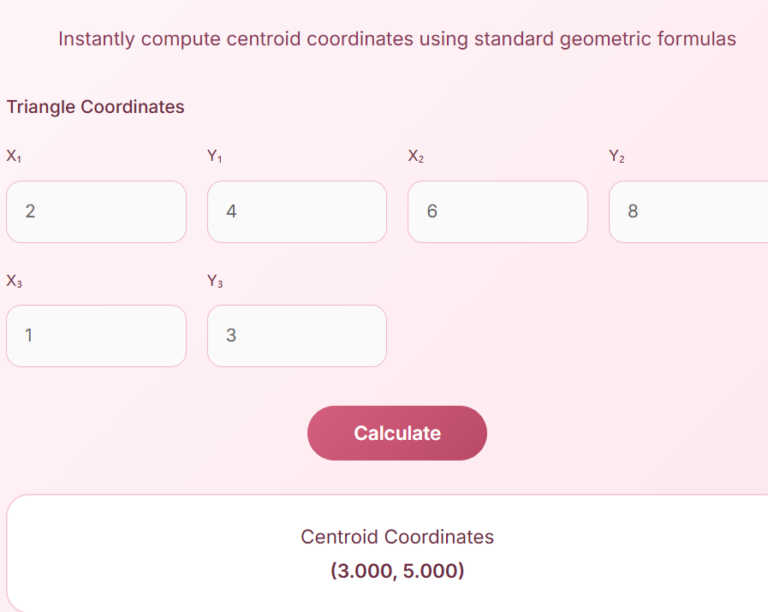
- Enter the coordinates of the first vertex: X1 and Y1, for example 2 and 4.
- Enter the coordinates of the second vertex: X2 and Y2, for example 6 and 8.
- Enter the coordinates of the third vertex: X3 and Y3, for example 1 and 3.
- Click Calculate to see the Centroid Coordinates.
Enter the coordinates as numbers, using a decimal point for fractions, such as 2.5. The vertices can be in any order: the centroid is the same whichever corner you list first. Negative coordinates work too, if your triangle sits across the axes.
The Centroid Formula
The calculator uses the average of the vertices:
Centroid X = (X1 + X2 + X3) / 3
Centroid Y = (Y1 + Y2 + Y3) / 3
In words, add the three x coordinates together and divide by three for the centroid’s x, and do the same with the y coordinates for its y. The result is a point (Cx, Cy) that is the centre of the triangle.
Worked Example
Take a triangle with vertices (2, 4), (6, 8) and (1, 3).
Add the x coordinates: 2 + 6 + 1 = 9, and divide by 3 to get 3. Add the y coordinates: 4 + 8 + 3 = 15, and divide by 3 to get 5.
So the Centroid Coordinates are (3.000, 5.000), which is exactly what the calculator shows for these inputs. If you plot the three points, the centroid sits inside the triangle, roughly in its middle, just as it should.
When to Use It and Tips
Use this calculator for geometry homework, for finding the centre of a triangular part or plate in engineering, for checking the balance point of a design, and for any problem that asks where a triangle balances. It is also useful when you are working with coordinates and want a quick, exact answer without solving simultaneous equations.
- Check that the three points really make a triangle. If they lie on a straight line, there is no triangle and the point is meaningless.
- Keep the x and y values in the right boxes, because swapping them gives a different, wrong point.
- Remember that the centroid is inside the triangle, so an answer outside it means a mistake.
- For other shapes, split the shape into triangles, find each one’s centroid, and combine them by area.
The centroid is where the medians meet, and the Arc Length Calculator measures another way a centre shapes a curve: the length of an arc from its radius and angle. If you want to see how a centre of mass behaves under gravity, the Gravitational Force Calculator works out the pull between two masses.
FAQs
Q1: What is a centroid?
The centroid is the geometric centre of a shape: the point where it would balance if it were made of a uniform material. For a triangle, it is where the three medians meet, and it is also the average of the three corner coordinates.
Q2: Can I use this centroid calculator for other shapes?
This calculator works for triangles. For other shapes, split the shape into triangles, find each triangle’s centroid, and combine them by area. A rectangle’s centroid is the intersection of its diagonals, and a circle’s centroid is its centre.
Q3: Is this centroid calculator accurate?
Yes, it uses the standard formula, the average of the three vertices, and gives the exact centroid for the coordinates you enter.
Q4: Can I use it on my phone?
Yes, the calculator is fully responsive and works on mobile, tablet and desktop.
Q5: Do I need to install any software?
No installation is required. You can use it directly in your browser.
Q6: Who can use this calculator?
Students, teachers, engineers, architects, designers, and anyone learning geometry can use it. It suits homework, design work and engineering checks alike.
Disclaimer
Disclaimer: This calculator is for educational and informational purposes only. It finds the centroid of a triangle from the coordinates you enter, using standard geometry. Always check the result with your own work before using it in a design or engineering decision.