
Torque Calculator
Introduction
Every bolt you tighten, every door you open, and every wheel that turns relies on torque, the twisting force that makes things rotate. A long spanner turns a stubborn bolt with less effort than a short one, and this Torque Calculator shows you why in numbers. You enter the force in newtons and the distance from the pivot in metres, and the tool returns the torque in newton-metres. Students use it for physics problems, mechanics use it to set spanner settings, and engineers use it to check motors, shafts, and fastenings. This guide explains what torque is, how the calculator works, and how to read the answer, so you can size up any turning job with confidence.
What Is a Torque Calculator?
A Torque Calculator is an online tool used to calculate torque by using force and distance. Torque is a rotational force that causes an object to rotate around an axis. It is commonly used in physics, mechanical engineering, automotive work, and construction. This calculator helps you quickly find torque without doing manual calculations.
Torque is what turns a spanner, spins a motor shaft, and opens a door. The force matters, and so does where you apply it: the same push creates more torque the further from the pivot you apply it, which is why a long handle beats a short one. To work out the straight line force behind a turning job, our Force Calculator pairs with this tool, and the two together cover the most common mechanics questions.
How to Use the Torque Calculator
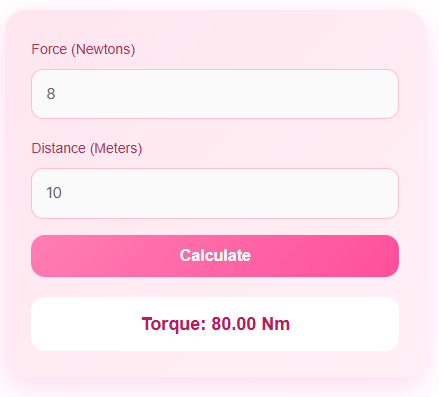
Using this torque calculator is very simple, and it takes four steps that match the fields you can see above.
Enter the Force value in Newtons (N) in the Force (Newtons) box.
Enter the Distance value in meters (m) in the Distance (Meters) box. Measure from the pivot, or axis, to the point where the force is applied.
Click the Calculate button.
The torque result will be displayed instantly in Newton-meters (Nm), for example Torque: 25.00 Nm. No technical knowledge is required.
The Formula: Torque Equals Force Times Distance
The calculator applies the standard formula: Torque equals Force multiplied by Distance, written as torque equals F times d. The unit follows from the inputs: newtons multiplied by metres gives newton-metres. Because the formula is a multiplication, doubling either the force or the distance doubles the torque, and halving one halves the result. In real turning, the angle matters too: this tool gives the maximum torque, which happens when the force is applied at a right angle to the lever, as with a spanner pulled straight. The turning effect of a moving object has a rotational cousin in momentum, and our Momentum Calculator works out the straight line version from mass and velocity.
Worked Example: 50 Newtons at 0.5 Metres
Suppose you push on the end of a spanner with a force of 50 newtons, and the spanner is 0.5 metres long from the bolt to your hand. Enter 50 in the Force (Newtons) box, enter 0.5 in the Distance (Meters) box, and click Calculate. The calculator returns Torque: 25.00 Nm. You can check the answer by hand: 50 multiplied by 0.5 equals 25, and the unit is newton-metres. If you used a spanner twice as long, 1 metre, the same push would give 50.00 Nm, exactly double, which is why a longer handle turns a tight bolt more easily.
When to Use It and Tips for Good Results
The calculator is useful whenever something turns. Students reach for it in physics coursework and exam revision, where torque problems appear in nearly every mechanics topic. Mechanics and DIY enthusiasts use it to work out the turning force on bolts, nuts, and wheel fastenings, so they can choose the right spanner length or the right torque setting. Engineers use it for motors, shafts, gears, and lifting equipment, where too little torque means the machine will not turn and too much means parts may fail. It is also handy for everyday jobs: loosening a jar lid, turning a tap, or opening a stiff door are all torque in action.
A few habits keep your results sound. First, measure the distance from the pivot to the point where the force acts, not the total length of the tool, because only the lever arm from the pivot counts. Second, push at a right angle to the lever whenever you can, because that gives the greatest torque for the same force, and the calculator assumes that best case. Third, keep your units consistent: newtons with metres gives newton-metres, and mixing in centimetres or pounds without converting will make the answer wrong by a large factor. Fourth, remember torque is not the same as force: the same push gives a different torque with a longer handle, and a bigger force gives more torque with the same handle. Finally, for safety critical fastenings, always confirm the required torque from the maker, and use a torque wrench rather than trusting a calculation alone. The turning effect of a spinning object stores its energy as rotation, and our Kinetic Energy Calculator works out the energy of moving objects from mass and velocity.
Frequently Asked Questions
What is torque?
Torque is a force that causes an object to rotate around a point or axis. It is the turning effect of a force, and it depends on both the size of the force and the distance from the pivot where it is applied.
What unit is torque measured in?
Torque is measured in Newton-meters (Nm). That comes from multiplying force in newtons by distance in metres.
Can I use this calculator on my mobile phone?
Yes, this torque calculator is fully responsive and works on all devices, so you can use it in the workshop on a phone or in the office on a computer.
Is this calculator free to use?
Yes, it is completely free and available online, and you can run as many calculations as you like.
Who can use a torque calculator?
Students, engineers, mechanics, and anyone working with rotational force can use it. No specialist knowledge is needed beyond the force and the distance.
What is the difference between torque and force?
Force pushes or pulls in a straight line, while torque twists around a pivot. The same force makes more torque when it is applied further from the pivot, which is why longer spanners turn tight bolts more easily.
Disclaimer
Disclaimer: This Torque Calculator is for educational and informational purposes only. The results are estimates based on the force and distance you enter, and they are not a substitute for professional engineering or mechanical advice. Always confirm important results with a qualified professional or suitable measuring equipment before you rely on them for a decision.