
Mean Calculator
Quickly calculate the average (mean) of your numbers
What is Mean Calculator?
A Mean Calculator is an essential tool for anyone working with numbers, data, or statistics. It helps you calculate the average (mean) of a set of numbers quickly and accurately. Instead of doing manual calculations that can be time-consuming and prone to errors, this tool simplifies the process and delivers results instantly.
The idea is simple: add all the numbers together, then divide by how many there are. That idea is the Arithmetic mean, the most common kind of average, and it is the one this calculator finds for you.
The mean is one of the most common measures in mathematics and statistics. It provides a central value of a dataset, helping users understand the overall trend or typical value of the numbers they are analysing. This makes the Mean Calculator particularly useful for students, teachers, business analysts, data enthusiasts, and researchers who deal with numerical data regularly.
A mean works best when your numbers share the same unit. If your readings come from measurements, check the units first. Our Ruler Calculator converts centimetres to inches, so you can line up your measurements before you average them.
How to Use the Mean Calculator?
Using this Mean Calculator is extremely simple, even for beginners:
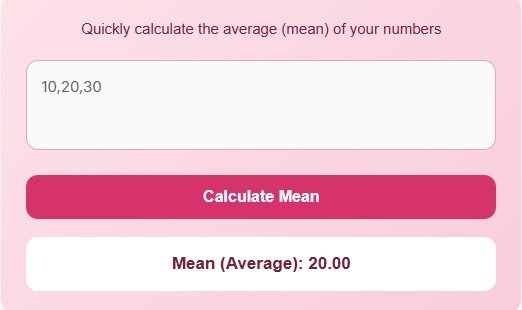
Enter your numbers: Type all the numbers in the input box, separated by commas (e.g., 12, 25, 33, 47). Decimals and negative numbers work too, so you can average temperatures, balances or changes as well as whole numbers.
Click “Calculate Mean”: Once you click the button, the tool will automatically sum all the numbers and divide by the total count.
Get your result instantly: The mean (average) value of your numbers will appear in seconds. For 10, 20, 30, 40, 50 it shows 30.00. Check the number against what you expect before you use it in a report or a decision.
Try another set: To try another set, delete the numbers in the box and type a new set. You can compare two groups, such as two classes or two months, one set at a time.
No advanced math knowledge is required. You don’t have to worry about formulas or manual calculations. This tool is designed to save time, reduce errors, and make your data analysis faster and more accurate.
The mean is the same as the average. Try our average calculator for a quick average of any set of numbers.
The Formula for the Mean
The mean is found with one short formula. Add all the values together to get the sum, then divide the sum by the number of values. Written out, it is: mean = sum of all values / number of values.
This works for any set of numbers, large or small. Two values need two numbers added and divided by two. A hundred values need a hundred numbers added and divided by a hundred, and the calculator does the adding and counting for you.
Worked example
Take the numbers 10, 20, 30, 40, 50. First add them: 10 + 20 + 30 + 40 + 50 = 150. There are 5 numbers, so divide the sum by 5: 150 / 5 = 30. The calculator shows Mean (Average): 30.00, which matches the hand calculation exactly.
The same set shows how the mean sits in the middle of the data. The middle value, 30, equals the mean here because the numbers are evenly spaced. The same add-and-divide idea appears in other maths tools too, from grade averages to vector work in our Gram-Schmidt Calculator.
Advantages of Using a Mean Calculator
Using a Mean Calculator comes with several benefits:
Saves Time: Manual calculations for large datasets can be tedious. This calculator gives instant results, even for long lists of numbers.
Accuracy: Reduces human error in calculations, ensuring precise results. The adding and dividing happen in one step, so nothing gets lost along the way.
Easy to Use: Even beginners can calculate the mean without learning formulas. Type the numbers, click the button, and read the result.
Mobile Friendly: The calculator works on desktops, tablets, and mobile devices, making it accessible anytime, anywhere.
Educational Tool: Ideal for students learning mathematics or statistics, as it demonstrates how averages are calculated. Seeing the sum and the count makes the formula easy to follow.
By using this tool, you can quickly analyse datasets, make informed decisions, or check your manual calculations with ease.
When to Use the Mean
The mean is the right choice when your numbers cluster around one typical value. Test scores, daily temperatures, monthly spending and average speeds all suit it well, because no single value sits far from the rest.
Use it to compare groups fairly. Two classes with different numbers of pupils can be compared by their mean scores, and two months of sales can be compared by their mean daily takings, even when the months have different lengths.
When a few extreme values pull the average away from the typical value, look at the middle value as well. The Median is the middle number in an ordered list, and it stays steady when one very large or very small value would distort the mean.
Limitations to Keep in Mind
A mean hides the spread of your data. Two sets can share the same mean of 30 yet look very different: one may run from 28 to 32 while the other runs from 0 to 60. Always check the range and the individual values before you draw a conclusion.
The mean also says nothing about which value turns up most often. For that, the Mode (statistics) is the better measure: it names the value that appears most in the set. For more maths tools, browse our All Calculators page.
FAQs
Can I use negative numbers?
Yes, the calculator works with both positive and negative numbers, providing accurate results in all cases. Type them with a minus sign, for example -5, 0, 8, and the sum and the count will handle the mix correctly.
Can I include decimals?
Absolutely. Decimal numbers are fully supported for precise calculations, so values such as 4.5 or 9.75 work just like whole numbers. The result is shown to two decimal places.
What happens if I enter text instead of numbers?
Non-numeric values are ignored automatically. Only valid numbers are included in the calculation, so stray letters or words will not break the result. Still, it is best to enter clean numbers separated by commas.
Is this calculator free to use?
Yes, the Mean Calculator is completely free and accessible online. There is no sign-up, no download and no limit on how many sets of numbers you can average in a day.
Can it handle large datasets?
Yes, you can enter as many numbers as needed, separated by commas, and the calculator will compute the mean efficiently. For very long lists, check that every value was typed correctly before you trust the result.
Disclaimer
This Mean Calculator is intended for educational and informational purposes only. While it provides accurate results using standard formulas, it is not a substitute for professional statistical analysis or decision making. Always verify results when using them for critical tasks or official purposes.