
Entropy Calculator
What is Entropy Calculator?
An Entropy Calculator is a useful online tool that measures the level of uncertainty or randomness in a dataset or a probability distribution. In simple terms, entropy is a concept from information theory that shows how unpredictable a system is. The higher the entropy value, the greater the uncertainty; the lower the entropy, the more predictable the system. Entropy in information theory is explained in detail in Entropy (information theory) – Wikipedia.
This calculator is widely used in fields like data science, machine learning, physics, and communication systems. It allows you to calculate entropy quickly without working through logarithms by hand. Whether you are a student, a researcher, or a developer, it simplifies the process and saves valuable time.
By entering probability values into the calculator, you can instantly get accurate entropy results, making it an essential tool for analysing data distributions and understanding information content. The result is given in bits, the unit Shannon introduced for measuring information, so a fair coin flip scores exactly 1 bit and a weighted coin scores less.
Entropy is not just a theory number. Compression tools use it to judge how small a file can get, cryptography uses it to judge how hard a key is to guess, and data scientists use it to compare how mixed a dataset is. Knowing the entropy of a distribution tells you how much information each new observation can carry.
How to Use It
Using the Entropy Calculator is very simple and beginner-friendly. Follow these steps:
- Enter the probability values in the input field, separated by commas, for example 0.5,0.3,0.2.
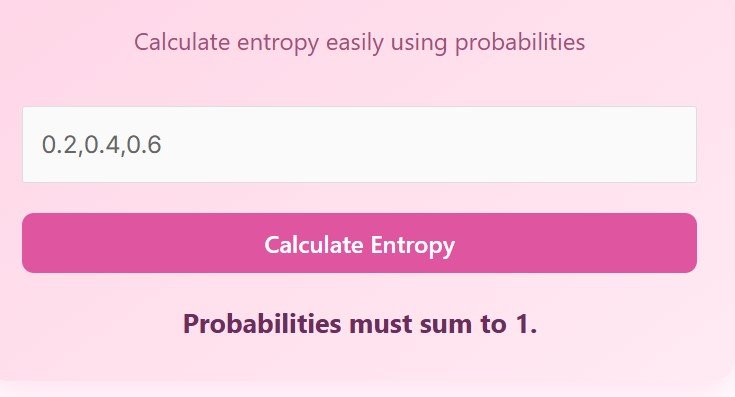
- Make sure all probabilities add up to 1. The calculator checks this and warns you if the total is off.
- Click on the “Calculate Entropy” button.
- Instantly view the entropy result displayed below the button, in bits.
The calculator automatically validates your input and ensures accurate calculations. If the sum of probabilities exceeds or does not equal 1, the calculation will not proceed and the calculator asks you to enter valid probabilities. It also rejects letters and empty entries, so check the commas between your numbers.
For example, three outcomes with probabilities 0.5, 0.3 and 0.2 add up to exactly 1, so the calculator accepts them and returns 1.4855 bits. If you type 0.5, 0.3 and 0.1 instead, the total is 0.9 and the calculator tells you the probabilities must sum to 1.
Formula and worked example
Shannon entropy measures the average surprise of a distribution. For each outcome, take its probability p, multiply it by log base 2 of p, take the negative of the sum over all outcomes, and you have the entropy in bits. The idea comes from Claude Shannon’s 1948 paper that founded information theory, as described in Information theory – Wikipedia.
H = −Σ p × log₂(p)
The sum is taken over every outcome, and 0 × log₂(0) is treated as 0
Entropy is measured in bits when the logarithm is base 2
Work through the example 0.5, 0.3, 0.2. The first outcome contributes −0.5 × log₂(0.5) = 0.5. The second contributes −0.3 × log₂(0.3) = 0.5211. The third contributes −0.2 × log₂(0.2) = 0.4644. Add them: 0.5 + 0.5211 + 0.4644 = 1.4855 bits. Enter 0.5,0.3,0.2 into the calculator above and it returns: Entropy: 1.4855 bits, which matches this working.
A result of 1.4855 bits means the distribution is fairly unpredictable, though less so than a perfectly even three-way split, which would give about 1.585 bits. A fair coin, with two equally likely outcomes, gives exactly 1 bit. A certain outcome, with probability 1, gives 0 bits, because there is nothing left to find out.
Use this calculator when you need to compare distributions, measure the information content of a message, or choose a split in a machine learning model. Decision trees pick the split that reduces entropy the most, as explained in Decision tree learning – Wikipedia. If you need the probability of a value in a normal distribution first, use the Normal Probability Calculator for Sampling Distributions. Keep in mind that this calculator only handles discrete probabilities that sum to 1, and it cannot measure entropy for continuous distributions or for text files directly.
The calculator is built for this one job. It removes the manual logarithm work, catches the common mistake of probabilities that do not add to 1, and works on phones, tablets and desktop computers with nothing to install. That makes it useful for a quick classroom check, a machine learning experiment, or a data compression estimate.
FAQs
What is entropy in simple terms?
Entropy is a measure of uncertainty or randomness in a system. Higher entropy means more unpredictability, while lower entropy means the outcome is easier to guess. A fair coin has an entropy of 1 bit, because the result is completely uncertain before the toss. A coin that always lands heads has an entropy of 0 bits, because the result is already known.
Why do probabilities need to sum to 1?
Because entropy is calculated based on a complete probability distribution, where all possible outcomes are accounted for. If the probabilities add to less than 1, some outcomes are missing, and the result understates the uncertainty. If they add to more than 1, the distribution is impossible. This calculator checks the total and warns you when the probabilities do not sum to 1, so you can fix the entries before you trust the result.
Can I use this calculator for machine learning?
Yes, entropy is commonly used in decision trees and other machine learning algorithms. A decision tree chooses each split by asking which feature reduces entropy the most, which is measured by information gain. This calculator lets you test the entropy of a split before you build a model, so you can see which feature separates the classes best.
What happens if I enter invalid values?
The calculator will notify you if the inputs are incorrect or do not sum to 1. Enter letters, an empty field, or a total above or below 1, and it shows a message instead of a result. Check that your numbers are separated by commas, that they are all between 0 and 1, and that they add up to 1 before you click Calculate Entropy again.
Is this tool free to use?
Yes, the Entropy Calculator is completely free and accessible online. There is no sign-up, no download, and no limit on how many calculations you can run. It works on phones, tablets and desktop computers, so you can use it wherever you are studying or working.
Disclaimer
This calculator provides approximate results for educational and informational purposes only. Always verify critical calculations manually or with professional tools when required.