
Rounding Calculator
What is a Rounding Calculator?
In the world of mathematics and data analysis, precision is key, but sometimes “too much” information can lead to confusion. A Rounding Calculator is a specialized digital tool designed to simplify numerical values by reducing their decimal places or rounding them to the nearest integer. Whether you are a student working on a physics problem, a developer building a financial app, or a business owner calculating tax, this tool helps you achieve a clean and professional look for your data.
Rounding is the process of replacing a number with an approximate value that has a shorter, simpler, or more explicit representation. For example, rounding the value $15.8762$ to two decimal places gives you $15.88$, which is much easier to communicate in a professional report. Our rounding calculator automates this process, ensuring that you follow standard mathematical rules without the risk of manual calculation errors.
How to Use the Rounding Calculator?
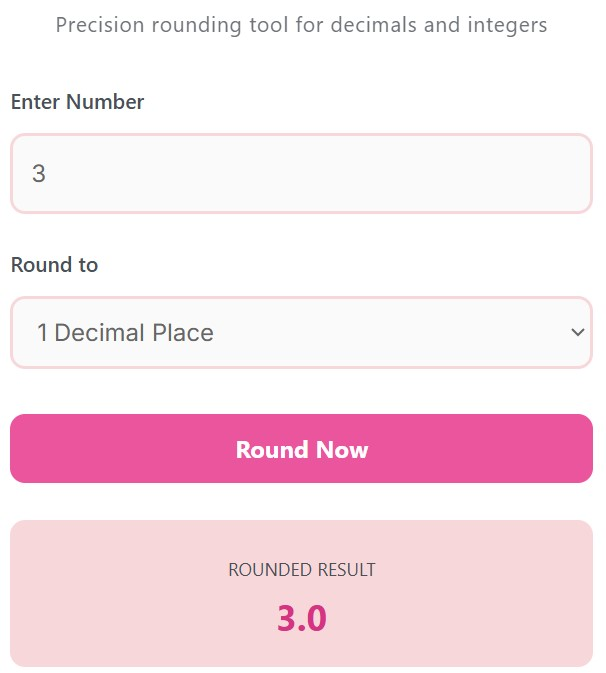
Our rounding calculator is designed with a user-friendly interface to ensure that even a “newbie” can get results in seconds. Here is a step-by-step guide to using it effectively:
Input Your Value: In the first field labeled “Enter Number,” type the digits you wish to process. You can enter whole numbers, long decimals, or even negative values.
Choose Your Precision: Use the “Round to” dropdown menu to select your desired level of accuracy.
Select Whole Number if you want to remove all decimals.
Select 1 to 4 Decimal Places depending on how much detail your specific project requires.
Click “Round Now”: Once you hit the button, our script instantly processes the number using the “round half up” method (the standard rule used in schools and businesses).
View the Result: The rounded figure will appear in a soft-pink highlighted box at the bottom, ready for you to copy and use.
Advantages of Using a Rounding Tool
Why should you rely on a rounding calculator instead of doing it manually? Here are the primary benefits:
Elimination of Human Error: Manually rounding long strings of digits is prone to “skipping” a place value. An automated tool provides 100% accuracy every time.
Time Efficiency: If you are processing a large volume of data, rounding each number in your head is exhausting. This tool provides instant feedback, allowing you to focus on more important tasks.
Professional Clarity: Cluttered numbers make reports look messy. Rounding helps create clean visuals, charts, and tables that are easier for your audience to understand at a glance.
Financial Standardization: In the business world, currency must be rounded to two decimal places. This tool ensures your bookkeeping and tax calculations stay within banking standards.
Consistency Across Projects: Using a single tool ensures that every number in your project follows the same mathematical logic, preventing discrepancies between different sets of data.
Frequently Asked Questions (FAQs)
1. What is the basic mathematical rule for rounding?
The most common rule (and the one used by this calculator) is: if the digit following your rounding point is 5 or greater, you round up. If it is 4 or less, the rounding digit stays the same.
2. Why is rounding to two decimal places so common?
This is primarily due to global currency systems. Most currencies, such as the Dollar, Euro, or Pound, are divided into hundredths (cents/pennies). Therefore, two decimal places provide the most practical financial representation.
3. Does rounding change the accuracy of my data?
Rounding creates an approximation. While it makes the number easier to read, it does technically lose a tiny bit of precision. It is important to choose a rounding level that balances readability with the needs of your specific project.
4. Can I round negative numbers?
Yes. This calculator applies the same logic to negative values. For example, rounding -5.7 to a whole number will result in -6.
5. What does “Rounding to the Nearest Integer” mean?
This is simply another way of saying “Rounding to a Whole Number.” It means you are removing all fractional parts to find the closest full number.
Disclaimer:
This rounding calculator is provided for educational and informational purposes only. While we strive for 100% accuracy, we are not responsible for any financial, legal, or academic discrepancies resulting from its use.