
Triangle Calculator
Enter one leg to calculate all sides of a 45-45-90 triangle.
What is a triangle calculator?
A triangle calculator finds missing sides, angles, area and perimeter from the measurements you already know. Instead of working through sine, cosine and Pythagoras by hand, you enter the known values and the tool applies the right formula. It is useful for homework, design work and quick checks on site.
The calculator on this page is built for 45-45-90 triangles, the special right triangle with two equal legs and angles of 45, 45 and 90 degrees. Enter one leg and it finds the other leg and the hypotenuse. A triangle is a three sided polygon whose angles add up to 180 degrees, as described in Triangle – Wikipedia.
A regular hexagon is made of six equilateral triangles, so the Hexagon Calculator uses the same geometry to work out the area, perimeter and apothem of a hexagon. Check the worked example below to see exactly what this calculator returns for a leg of 10 cm.
How to Use the Triangle Calculator
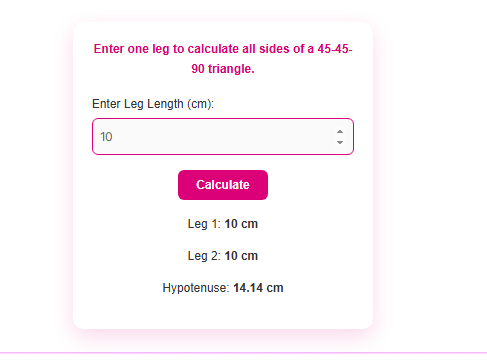
This calculator works with one number only, because a 45-45-90 triangle is fixed by a single leg. Check that your triangle really has angles of 45, 45 and 90 degrees before you start. If it does not, this tool will not give the right answer for it.
- Measure one leg of the triangle in centimetres.
- Type that leg length into the box that says Enter Leg Length (cm).
- Press Calculate.
- Read the results: the other leg and the hypotenuse.
The other leg equals the leg you entered, because the two legs of a 45-45-90 triangle are always equal. The hypotenuse is the leg multiplied by the square root of 2. The area is half the leg multiplied by itself, and that calculation is shown in the formula section below. To try another size, change the number and press Calculate again.
Formula and worked example
In a 45-45-90 triangle the two legs are equal, and the hypotenuse is the leg times the square root of 2. The area is half the product of the two legs, which is the same as half the square of one leg. These results come from the Pythagorean theorem, which says that in a right angled triangle the square of the hypotenuse equals the sum of the squares of the other two sides.
Hypotenuse = leg × √2
Area = (leg × leg) ÷ 2
Perimeter = leg + leg + hypotenuse
Take a leg of 10 cm. The other leg is also 10 cm. The hypotenuse is 10 × 1.4142 = 14.14 cm, rounded to two decimal places. The area is (10 × 10) ÷ 2 = 50 square centimetres. The perimeter is 10 + 10 + 14.14 = 34.14 cm. Enter 10 into the calculator above and you will see Leg 1: 10 cm, Leg 2: 10 cm and Hypotenuse: 14.14 cm, which matches this working.
The perimeter is useful if you need the total length around the triangle, for example to buy edging or trim. Add all three sides and keep the unit as centimetres. For a leg of 10 cm, the perimeter is 34.14 cm, which is the number you would give a supplier for the edge length.
This special triangle is also the triangle you get when you cut a square in half along a diagonal, which is why its legs are equal. The 45-45-90 triangle is a special right triangle, as described in Special right triangle – Wikipedia.
Benefits of Using a Triangle Calculator
Students use this calculator to check homework and to see how the hypotenuse and area follow from a single leg. It turns an abstract rule into a number they can test with a ruler and a protractor, which helps the idea stick. Teachers use it to make quick examples on the board without stopping to work out square roots by hand.
Builders and designers use a 45-45-90 triangle when they set out a square corner or a diagonal brace, because the equal legs make the layout simple. Carpenters use it to cut mitres at 45 degrees, and roofers use it for a roof pitch with equal rise and run. In each case, knowing the hypotenuse tells you the length of the diagonal cut.
Designers also use the 45-45-90 shape for square picture frames and for setting out tiles on a diagonal, because the equal legs keep the pattern even. If you are planning a garden bed or a patio in the shape of a square cut in half, the same triangle gives the diagonal length at once, which saves a trip back to the drawing board.
How the Triangle Calculator Works
When you type a leg and press Calculate, the calculator multiplies it by the square root of 2 to get the hypotenuse. It rounds the hypotenuse to two decimal places, so a leg of 10 cm gives 14.14 cm, not the full 14.1421356 cm. The calculation is exact for this triangle type, and the rounding is the only source of error. The area is worked out in the formula section on this page: it is half the square of the leg, which is 50 square centimetres for a leg of 10 cm.
This tool only works for 45-45-90 triangles. It cannot find sides from angles alone, because angles alone do not fix the size of a triangle. It also cannot solve scalene, equilateral or 30-60-90 triangles, which need different formulas. The Pythagorean theorem, which the tool relies on, is explained in Pythagorean theorem – Wikipedia.
Measure the leg carefully, because every result depends on that one number. A leg that is half a centimetre out gives a hypotenuse that is about 0.71 cm out, and an area that is further out still.
FAQs
Which triangles can this calculator solve?
Only 45-45-90 triangles, which are right angled triangles with two equal legs and angles of 45, 45 and 90 degrees. For other triangle types, use a general triangle calculator that takes three sides or two sides and an included angle.
Is the triangle calculator accurate?
Yes, for 45-45-90 triangles. The formulas are exact, and the only error comes from rounding the hypotenuse to two decimal places. Measure the leg carefully, because every result is calculated from that one number.
Can I use this calculator on mobile?
Yes, it works on phones, tablets and desktop computers. It needs no app and no sign up, and it works in any modern browser.
Do I need maths knowledge to use it?
No. Type one leg length in centimetres and press Calculate. The worked example on this page shows how the answers are found, so you can check the result by hand if you want.
Is this triangle calculator free?
Yes, it is completely free to use, with no limit on the number of calculations. You can use it as often as you like for homework, study or work.
Disclaimer
Disclaimer: This calculator provides results based on mathematical formulas for 45-45-90 triangles and should be used for education and estimation only. Always check critical measurements by hand or with a qualified professional before you cut, build or rely on them.