
Tile Calculator
Easily calculate the number of tiles required for your floor or wall area.
What is Tile Calculator?
A Tile Calculator is a practical online tool designed to make your tiling projects easier and more accurate. Whether you are installing floor tiles, wall tiles, or decorative tiles, this tool helps you calculate the exact number of tiles you need. Instead of relying on guesswork or rough estimations, the Tile Calculator uses your room dimensions and tile size to provide precise results. This ensures you purchase the right amount of tiles, saving money, reducing waste, and streamlining your project planning. It is especially useful for homeowners, interior designers, contractors, and DIY enthusiasts who want efficiency and accuracy in their tiling projects.
How to Use Tile Calculator
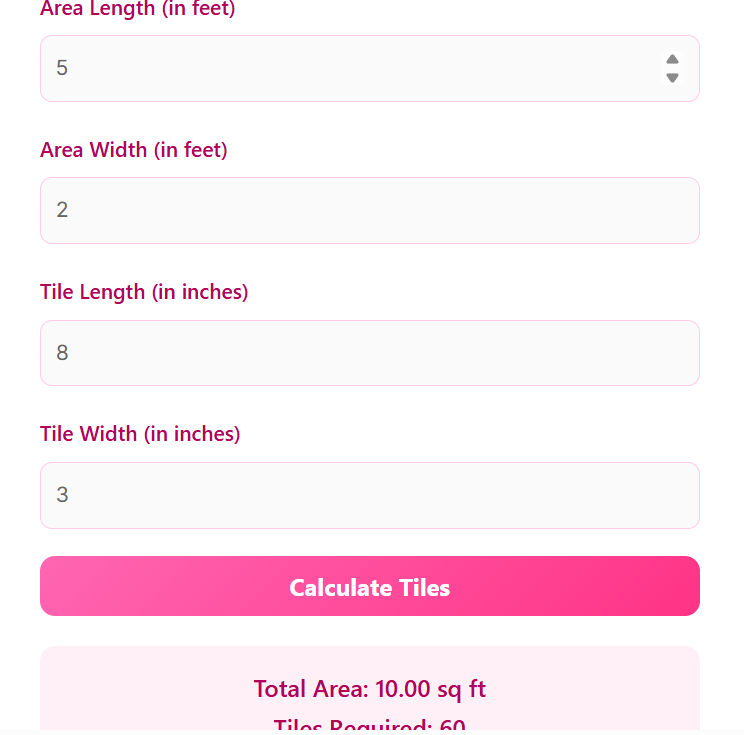
Using the Tile Calculator is simple, fast, and convenient. Here’s a step by step guide:
Measure the Area: First, measure the length and width of the area you plan to tile. Make sure your measurements are accurate for precise results.
Enter Tile Dimensions: Next, input the length and width of a single tile in inches or centimeters. The calculator can handle different tile sizes, including square and rectangular tiles.
Click Calculate: Once all values are entered, click the calculate button. The Tile Calculator instantly processes the data.
View Results: The tool will display the total number of tiles required for your project, as well as the total area covered. You can then plan your purchases accordingly.
By following these simple steps, you eliminate the risk of errors and save time that would otherwise be spent on manual calculations.
The Tile Formula and a Worked Example
Tiles needed = Room area in square feet divided by Tile area in square feet. One square foot equals 144 square inches, so work the tile area out in square inches first and then divide by 144 to get square feet.
Take a room that is 15 feet long and 12 feet wide, with tiles that are 12 inches by 12 inches. The room area is 15 times 12, which is 180 square feet. Each tile covers 12 times 12, which is 144 square inches. Divide 144 by 144 and one tile covers 1 square foot. Divide 180 by 1 and the answer is 180 tiles. Enter 15, 12, 12 and 12 in the tool and it gives the same figures: Total Area 180.00 sq ft and Tiles Required 180.
Always round the count up. A part tile still counts as a whole tile, because you cannot buy half a tile. If the maths gives 180.4 tiles, buy 181, then add the waste allowance on top of that.
Buy a few extra tiles for cuts and breakage. A waste allowance of 10 percent adds 18 tiles to this example, so buy 198 tiles in total. That matches the advice in the FAQ section below, which suggests adding 5 to 10 percent extra.
Most floor tiles come in a few common sizes. A 12 inch by 12 inch tile covers 1 square foot, so the tile count is the same as the room area in square feet. A 24 inch by 24 inch tile covers 4 square feet, so divide the room area by 4. A 12 inch by 24 inch tile covers 2 square feet, so divide the room area by 2. Check the size printed on the box before you order.
If you also want the cost of the floor, the Flooring Calculator works out the area and the flooring cost from the same room measurements.
Tiles for Different Rooms and Patterns
A bathroom floor and a kitchen wall need the same maths, but the waste is not the same. Straight runs on a large open floor waste very little, often 5 percent. A small room with lots of corners wastes more, because more tiles are cut. A diagonal layout or a herringbone pattern wastes the most, often 15 percent or more, because every edge tile is cut at an angle.
Wall tiles are usually smaller and lighter than floor tiles, and the grout joints are often narrower. A wall with a window or a door needs more cuts around the opening, so allow extra tiles there. A shower wall also needs tiles that suit wet areas, so check the rating on the box before you buy.
If the room will also have wall panels, the Wainscoting Calculator estimates the panels for the same walls, so you can plan the whole room in one go.
How to Measure a Room for Tiling
Measure the length and width at the longest points of the room, and measure twice before you order. Note the tile size in inches while the room is in feet, and remember that one foot is 12 inches. If your tape shows centimetres, divide by 30.48 to get feet.
Measure each wall or floor separately and add the areas together. A room that is not a neat rectangle can be split into rectangles. Work out each part, add the parts together, and use that total in the tool. That keeps the count right even when the room has an alcove or a bay.
Advantages of Tile Calculator
The Tile Calculator offers several advantages that make it a must-have for any tiling project:
Saves Money: Avoid buying excess tiles that may remain unused. This helps keep your project budget friendly.
Saves Time: Manual calculations can be time-consuming. The Tile Calculator delivers instant results with a single click.
Ensures Accuracy: Accurate measurements reduce errors, ensuring you purchase exactly what is needed.
Convenient: Accessible directly on your website, the calculator can be used anytime without the need for additional tools.
Eco-Friendly: By reducing tile wastage, it supports sustainable building practices.
Versatile: Suitable for both residential and commercial projects, as well as for wall and floor tiling.
With these benefits, the Tile Calculator simplifies project planning, giving you confidence that your tiling will go smoothly.
FAQs
Q1: Can I use the calculator for both floor and wall tiles?
Yes! The Tile Calculator is suitable for any type of tiling project.
Q2: Does it include extra tiles for cuts or breakage?
The basic calculation shows exact requirements, but it is recommended to add 5 to 10% extra tiles manually for safety.
Q3: Can I use different units of measurement?
Yes, you can enter dimensions in inches, feet, or centimeters after converting units as needed.
Q4: Is the Tile Calculator free to use?
Absolutely! It is a free and easy-to-use tool available directly on your website.
Q5: How accurate is it?
The calculator is highly accurate, as long as you provide correct area and tile dimensions.
By using a Tile Calculator, you ensure every tile project is cost effective, efficient, and hassle free. This tool is an essential addition to any home improvement or construction website, providing real value to visitors while improving engagement and user experience.
If the job also needs timber for the subfloor, the skirting, or the trim, work out the lumber before you order. The Board Foot Calculator gives the volume of boards from their thickness, width, length and the number of pieces, so you can price the timber beside the tiles.
Disclaimer
This calculator is provided for general informational purposes only. We cannot guarantee that calculations are 100% accurate, and users should verify results independently before relying on them. This tool is not a replacement for professional advice or official methods when accuracy is critical.
For critical or professional applications, always verify calculations with industry standards or consult an expert.