
Nether Portal Calculator
Convert Overworld coordinates to Nether coordinates easily.
Nether Coordinates: X: -- , Z: --
A Fast and Precise Way to Convert Minecraft Coordinates
Travelling through the Nether is the fastest way to cross long distances in Minecraft. One block in the Nether equals eight blocks in the Overworld, so a short walk through a portal can move you thousands of blocks. This Nether Portal Calculator does the maths for you: enter your Overworld X and Z coordinates, and it tells you where to build your Nether portal.
You can use it to line up two portals so they join to each other, to plan a fast route to a faraway base, or to work out where a portal in the Nether will come out in the Overworld. The tool works for the Java and Bedrock editions, and it runs on phones, tablets, and computers. When you need to work out how many blocks a build needs, try the Minecraft Stack Calculator as well.
The calculator only converts the horizontal coordinates, X and Z. The Y coordinate stays the same, because height does not affect portal linking. This guide explains the 8 to 1 rule, works through a real example, and answers the questions players ask most.
How to Use the Nether Portal Calculator
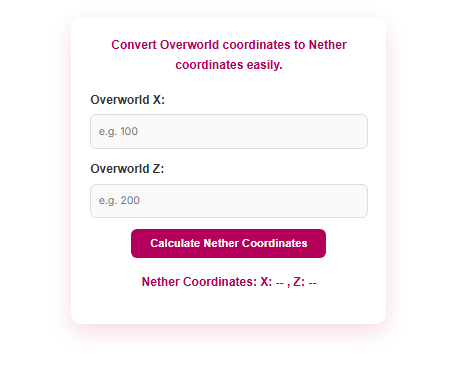
Converting coordinates takes less than a minute. Follow these steps and the Nether coordinates appear at once.
- Enter the Overworld X coordinate in the first field, for example 800.
- Enter the Overworld Z coordinate in the second field, for example 400.
- Click the Calculate Nether Coordinates button.
- Read the Nether X and Z shown below the button.
- Build your Nether portal at those coordinates.
Use whole numbers, and keep the minus sign if a coordinate is negative. The calculator divides both values by 8, so a negative Overworld value gives a negative Nether value.
Tips for Accurate Portal Travel
Small checks make portal travel much smoother. Always double check the numbers you type before you click Calculate, because one wrong digit can put your portal hundreds of blocks from your base. Write the Nether coordinates down or take a screenshot before you go through the portal, so you can find your way back.
Build your Nether portal in a safe spot, away from lava and high drops. Light the area around it and mark it with a sign or a coloured block so you can spot it at once. If two Overworld portals sit close together, they can link to the same Nether portal, so spread your bases out or plan the routes with the calculator first.
Remember that the game picks the nearest portal within 128 blocks in the Nether. That is why exact coordinates matter: a portal built a few blocks off can send you to the wrong place.
Benefits of Using This Calculator
Using the calculator saves time and stops costly mistakes. It works out both coordinates at once, so you never have to divide by 8 in your head. The answers are exact, which means your portals link correctly the first time instead of dropping you far from your base.
It is fast enough to use while you play. Type the numbers, click the button, and build at the spot it gives you. There is nothing to install and nothing to sign up for, and it works the same on Java and Bedrock.
The Nether Portal Formula
In the Overworld, one Nether block covers eight Overworld blocks. The rule is simple: Nether X equals Overworld X divided by 8, and Nether Z equals Overworld Z divided by 8. Write it as Nether X = Overworld X / 8 and Nether Z = Overworld Z / 8. Going the other way, multiply by 8: an Overworld spot is eight times its Nether position in both directions.
The Y coordinate does not change, because height works the same in both worlds. That is why the calculator only asks for X and Z. If your answer has a decimal, the game rounds to the nearest whole block when it places the portal, so building within one or two blocks of the answer is fine.
Worked Example: Converting Coordinates
Take an Overworld base at X 800 and Z 400. Divide each value by 8: 800 / 8 = 100 and 400 / 8 = 50. Build your Nether portal at X 100 and Z 50, and it will link to the base. Try the same numbers in the calculator above and you will see X 100, Z 50.
The saving is easy to see. Walking 800 blocks in the Overworld takes far longer than walking 100 blocks in the Nether, so this one portal can cut a long trip to an eighth of its length. To plan how much time a journey saves, try the Elapsed Time Calculator and compare the two routes.
Features of the Nether Portal Calculator
The calculator has a clean interface, works on all devices, gives instant results, and is free to use as often as you like.
How Portal Linking Works
When you step through a portal, the game looks for a matching portal in the other world. It searches within 128 blocks of the converted coordinates in the Nether, or 1,024 blocks in the Overworld. If it finds one, you come out there. If it finds nothing, it builds a new portal at the nearest good spot. That is why two Overworld bases close together can share one Nether portal, and why exact maths matters. If you like working with coordinates in other forms, the Rectangular to Polar Coordinates Calculator converts a position between the two systems players and builders use most.
Example Distances
The table shows how an Overworld trip shrinks in the Nether.
| Overworld | Nether |
|---|---|
| X 800, Z 400 | X 100, Z 50 |
| X 1,600, Z 800 | X 200, Z 100 |
| X 8,000, Z 0 | X 1,000, Z 0 |
Common Portal Mistakes
- Forgetting to divide by 8 and building the portal at Overworld coordinates.
- Building two portals too close together so they link to the same spot.
- Ignoring the Y level, then spawning over lava or in a wall.
- Not writing the coordinates down before stepping through.
Frequently Asked Questions About the Nether Portal Calculator
1. What is the Nether Portal Calculator?
It converts Overworld X and Z coordinates to Nether coordinates by dividing each value by 8. Enter your Overworld position, click Calculate, and it shows where to build the Nether portal so it links to that spot.
2. Can I use it on mobile devices?
Yes. The calculator is fully responsive, so it works on phones, tablets, and computers. The fields and buttons stay easy to use on a small screen, and the results show in the same place.
3. Why do I need this calculator?
It saves time and stops mistakes. Doing the division by hand is easy to get wrong, and one wrong number can put your portal hundreds of blocks away. The calculator gives exact answers every time.
4. Does it calculate vertical (Y) coordinates?
No. It only converts the horizontal X and Z coordinates, because height does not affect portal linking. Build the Nether portal at any safe height and it will link as long as X and Z match.
5. Is it free to use?
Yes, it is completely free. There is no sign up and no limit on how many times you use it, so you can convert coordinates for every base and portal in your world.