
CBM Calculator for Shipping
What is CBM Calculator for Shipping?
A CBM Calculator for Shipping is an online tool used to calculate the cubic meter (CBM) volume of packages or cargo. CBM stands for Cubic Meter, which is the standard unit used in international shipping to measure the volume of goods. Shipping companies, freight forwarders, exporters, and logistics professionals use CBM to determine how much space cargo will occupy inside a container, truck, or aircraft.
In global logistics and freight transportation, shipping cost is often calculated based on either weight or volume. When cargo is lightweight but takes up a large amount of space, the shipping company calculates charges based on volume rather than weight. This is where a CBM calculator becomes extremely helpful.
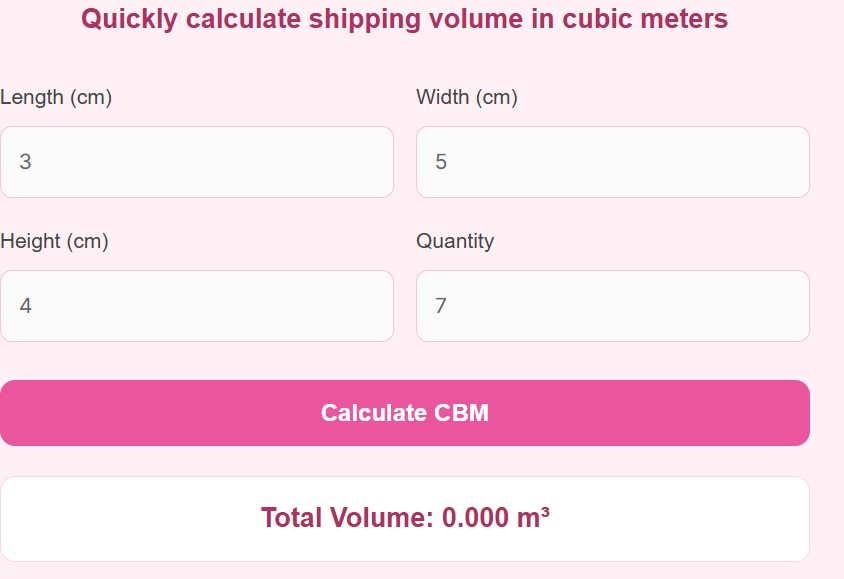
A CBM Calculator for Shipping allows users to quickly determine the cubic volume of their packages by entering the length, width, height, and quantity of boxes. The calculator then converts these measurements into cubic meters and provides an instant result.
For example, if a box measures 100 cm in length, 50 cm in width, and 40 cm in height, the CBM can be calculated by multiplying the three dimensions and converting them into cubic meters.
To understand the concept visually, the volume calculation follows this standard formula:
V = l × w × h
Where:
V = Volume (CBM)
l = Length
w = Width
h = Height
Using a CBM calculator eliminates manual calculations and ensures accurate shipping volume estimates. This helps businesses plan shipments efficiently, estimate freight costs, and optimize container space.
CBM calculators are commonly used in sea freight, air cargo, courier shipping, e-commerce logistics, warehouse management, and international trade.
How to Use CBM Calculator for Shipping
Using a CBM calculator is very simple and only takes a few seconds. Follow these steps to calculate the shipping volume of your cargo.
Step 1: Enter the Length
Input the length of the package or box in centimeters, meters, or inches depending on the calculator settings.
Step 2: Enter the Width
Next, provide the width of the package. Make sure the measurement unit matches the length unit.
Step 3: Enter the Height
Add the height of the box or cargo item.
Step 4: Enter Quantity
If you are shipping multiple boxes of the same size, simply enter the number of packages.
Step 5: Click Calculate
Once all values are entered, click the Calculate CBM button. The calculator will instantly show the total cubic meters (m³) for your shipment.
Step 6: Use the Result for Shipping Planning
You can now use the calculated CBM to:
Estimate shipping costs
Determine container space requirements
Compare freight rates
Plan logistics and packaging
Using an online CBM calculator saves time and helps avoid errors that may occur during manual calculations.
Advantages of Using a CBM Calculator for Shipping
A CBM calculator offers many benefits for individuals and businesses involved in shipping and logistics.
1. Accurate Shipping Volume Calculation
Manual calculations can lead to mistakes, especially when dealing with multiple packages. A CBM calculator provides instant and accurate volume results.
2. Saves Time
Instead of performing calculations manually, the tool automatically computes the volume within seconds.
3. Useful for International Shipping
Freight companies worldwide use cubic meters as the standard volume measurement, making CBM calculators essential for exporters and importers.
4. Helps Estimate Freight Costs
Shipping costs are often based on dimensional weight or volume. Knowing the CBM helps businesses estimate costs before booking shipments.
5. Better Container Space Management
With accurate volume calculations, companies can optimize container space utilization, reducing shipping expenses.
6. Ideal for E-commerce Sellers
Online sellers shipping products internationally can use the calculator to estimate packaging volume and logistics requirements.
7. Supports Bulk Shipment Planning
If you are shipping multiple cartons, the calculator can quickly determine the total volume of the entire shipment.
8. Easy to Use
Most CBM calculators require only basic inputs such as length, width, height, and quantity, making them user-friendly even for beginners.
FAQs
What does CBM mean in shipping?
CBM stands for Cubic Meter, which measures the total volume of cargo in a shipment. It is used by shipping companies to determine space requirements and freight costs.
Why is CBM important in logistics?
CBM helps shipping companies calculate how much space cargo occupies inside containers, trucks, or aircraft. It ensures efficient transportation and fair pricing.
How is CBM calculated?
CBM is calculated by multiplying length × width × height of a package and converting the result into cubic meters.
Is CBM used in air freight and sea freight?
Yes. CBM is widely used in sea freight, air cargo, rail freight, and road transportation to measure shipment volume.
Can CBM determine shipping cost?
In many cases, yes. Shipping companies compare actual weight vs volumetric weight and charge based on whichever is higher.
What unit is used for CBM?
CBM is measured in cubic meters (m³).
Can I calculate CBM for multiple boxes?
Yes. Most CBM calculators allow users to enter the quantity of packages, automatically calculating the total volume.
Is a CBM calculator free to use?
Most online CBM calculators are free tools that help users estimate shipping volume quickly.
Disclaimer
This CBM calculator provides estimated volume calculations for general shipping purposes and may not reflect the exact measurements used by all freight companies.
Always verify shipment dimensions and freight calculations with your shipping provider or logistics company before finalizing cargo bookings.