
Free Fall Calculator
What is Free Fall Calculator?
A Free Fall Calculator is a simple yet powerful physics tool that helps you determine how long an object takes to fall from a specific height and what its final velocity will be just before impact. In physics, free fall refers to the motion of an object when gravity is the only force acting upon it, while factors like air resistance are ignored. This calculator uses standard motion equations based on gravitational acceleration to provide quick and accurate results without the need for manual calculations.
This tool is especially helpful for students, teachers, and anyone learning the fundamentals of motion and gravity. Instead of solving complex formulas step by step, users can simply enter values and instantly understand how height and gravity affect falling objects. By simplifying physics concepts into an easy-to-use interface, the Free Fall Calculator makes learning faster, clearer, and more interactive.
If you only need the final speed, the Speed Calculator works it out from distance and time.
How to Use It
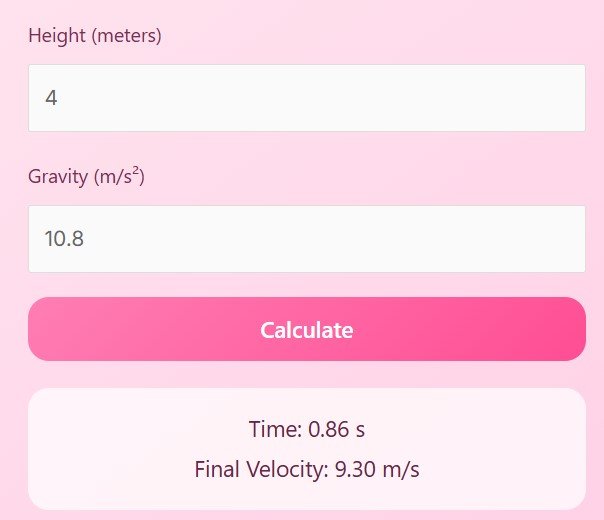
Using the Free Fall Calculator is very easy and requires no advanced technical knowledge. You only need to follow a few simple steps:
Enter the height from which the object is falling, measured in meters.
Check or adjust the gravity value if needed. The default value represents Earth’s gravity.
Click the calculate button to process the input.
Instantly view the results, including fall time and final velocity.
The calculator is designed to work smoothly across mobile phones, tablets, and desktop devices, allowing users to perform calculations anytime and anywhere. Its responsive layout ensures a seamless experience on all screen sizes.
The Free Fall Formulas Explained
Two formulas drive the calculator. The fall time t in seconds equals the square root of 2 times the height h, divided by the gravity g. In short, t equals the square root of (2h divided by g). The velocity v in metres per second equals gravity times the fall time, so v equals g times t.
You can also work out the velocity straight from the height. The velocity squared equals 2 times g times h, so v equals the square root of (2gh). All three formulas say the same thing in different forms, so the calculator can show both the time and the velocity from just the height and the gravity.
Gravity g is 9.8 metres per second squared on Earth. It stays the same for every object, which is why the calculator does not ask for weight. If you change g, the answers change, so pick the right value for the place where the drop happens. The Moon uses 1.62, Mars uses 3.71, and Jupiter uses 24.79.
Worked Example: A 100 Metre Drop
Drop an object from 100 metres on Earth with gravity at 9.8. Double the height to get 200, divide by 9.8 to get 20.41, and take the square root to get 4.52 seconds. That is the fall time. Multiply gravity by the time, 9.8 times 4.52, to get a final velocity of about 44.3 metres per second, which the calculator shows as 44.27 metres per second.
Try the same check with the calculator. Enter 100 in the height field and keep the gravity at 9.8, then press Calculate. The result should read 4.52 seconds and 44.27 metres per second. If you raise the height to 200 metres, the time rises to 6.39 seconds, which shows that doubling the height does not double the time. Gravity is an acceleration of 9.8 m/s squared, and the Acceleration Calculator can check the same change in speed over time for you.
Advantages
Using a Free Fall Calculator offers several benefits that make both learning and calculation easier and more efficient:
• Provides instant and accurate results based on proven physics formulas
• Eliminates the need for manual calculations and reduces human error
• Beginner-friendly design suitable for students and educators
• Helps users understand concepts like gravity, acceleration, and motion
• Works on all devices without installation or downloads
• Allows customization of gravity values for different environments
• Saves time and improves learning efficiency
One of the biggest advantages of this tool is its ability to simplify complex physics principles into practical, easy-to-understand results. This makes it an excellent educational resource for classroom learning, homework, and self-study.
Free Fall on Other Planets
Gravity changes from place to place, so the same drop takes a different time on each world. On the Moon, gravity is only 1.62, so an object dropped from 100 metres takes about 11.11 seconds to land.
On Mars, gravity is 3.71, so the same 100 metre drop takes about 7.34 seconds. On Jupiter, gravity is 24.79, so the same drop takes only about 2.84 seconds. The stronger the gravity, the shorter the fall.
Try these numbers in the calculator. Change the gravity field to 1.62, 3.71, or 24.79 and keep the height at 100 to see each time for yourself. It is a quick way to feel how different each planet really is.
How to Check Your Answer by Hand
Use the same steps as the worked example. Double the height, so 2 times 100 is 200, then divide by 9.8 to get 20.41. Take the square root to get about 4.52 seconds. Multiply 9.8 by 4.52 to get about 44.3 metres per second for the final velocity. If your hand check matches the calculator, your answer is right.
FAQs
What is free fall in physics?
Free fall is the motion of an object when gravity is the only force acting on it, with other forces like air resistance ignored.
Does this calculator consider air resistance?
No, the calculator assumes ideal conditions and does not include air resistance in the calculation.
Can I change the gravity value?
Yes, you can modify the gravity value to simulate different environments such as other planets.
Who can use this calculator?
Students, teachers, educators, and anyone interested in physics or motion concepts can use it easily.
Are the results accurate?
The results are accurate according to theoretical physics formulas under ideal conditions.
Does the weight of the object change the fall time?
No. In free fall, the mass cancels out, so a heavy object and a light object fall at the same rate when air resistance is ignored. The calculator does not ask for weight for this reason.
To work out the energy of the falling object, the Kinetic Energy Calculator uses mass and velocity.
Disclaimer: This Free Fall Calculator is for learning and general use only. Check important results by hand or with a qualified teacher before you use them in labs, school work, or safety decisions.