
Pay Raise Calculator
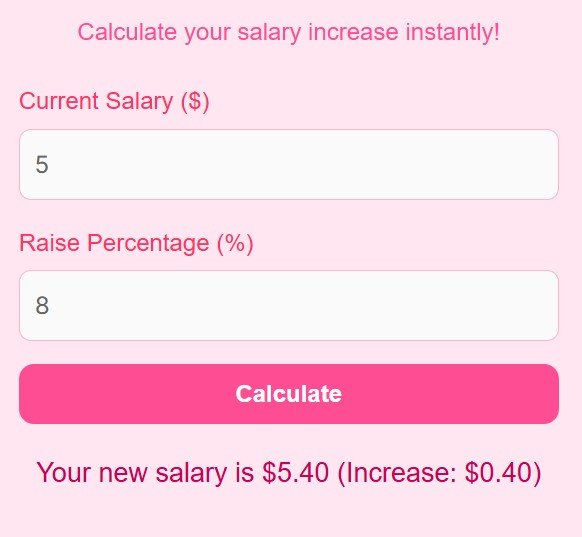
Calculate your salary increase instantly!
Introduction
A pay rise is one of the best moments in a working life, and also one of the most confusing. A 10 percent rise sounds generous, but what does it actually mean for your take home pay, your monthly budget and the salary you should ask for next time? A percentage on its own tells you very little, and many people accept a figure without ever working out the number behind it. This Pay Raise Calculator turns your current salary and your raise percentage into a clear new salary and the exact amount of the increase, so you know where you stand.
It is made for employees checking a raise, job seekers comparing offers, HR professionals and anyone planning a budget around a new salary. You enter two numbers, and the calculator does the rest.
What is a Pay Raise?
A pay raise is an increase in the amount you are paid for your work, usually given once a year. It can be a merit raise, for good performance, a cost of living raise, to match inflation, a promotion raise, when your job changes, or a market raise, when your pay is brought in line with similar jobs.
Most raises are stated as a percentage of your current salary. A 10 percent raise on a salary of 50,000 is an increase of 5,000, giving a new salary of 55,000. The same 10 percent is worth much more on a higher salary, which is why comparing percentages alone is misleading, and why it helps to see the actual money.
How to Use the Pay Raise Calculator
Follow these steps to work out your new salary:
- Enter your Current Salary ($), your annual salary before the raise, for example 50000.
- Enter the Raise Percentage (%), for example 10.
- Click Calculate to see your new salary and the increase amount.
Enter your annual salary as a single number, without commas or currency symbols, and enter the raise as a number, such as 10 for 10 percent. The calculator shows the new salary and the increase, both in the same currency as the salary you entered. It gives gross figures, before tax and deductions.
The Pay Raise Formula
The calculator uses these formulas:
Increase Amount = Current Salary x Raise Percentage / 100
New Salary = Current Salary + Increase Amount
In words, the increase is the raise percentage of your current salary, and the new salary is your current salary plus that increase. If you know the new salary and want the percentage, divide the increase by the current salary and multiply by 100.
Worked Example
Take a current salary of $50,000 and a raise of 10 percent.
First, the increase is 10 percent of 50,000, which is 5,000. Add it to the current salary: 50,000 + 5,000 = 55,000.
So your new salary is $55,000.00 and the increase is $5,000.00, which is exactly what the calculator shows for these inputs. If your raise were 5 percent instead, the increase would be 2,500 and the new salary would be 52,500.
When to Use It and Tips
Use this calculator when you are offered a raise, when you are comparing two job offers, when you are planning your budget for next year, or when you are working out what raise to ask for in a performance review. It is also useful when a raise is offered as a fixed amount, because you can work out what percentage that amount is.
- Compare the raise with inflation. A 3 percent raise when prices rise 4 percent is a pay cut in real terms.
- Check whether a raise is gross or net, because tax takes a share of it.
- Ask for the new salary in writing, with the date it starts.
- For hourly pay, multiply your hourly rate by your usual hours to get the equivalent salary first, then calculate the raise.
If overtime forms part of your pay, the guide What Is the 8 and 80 Overtime Rule? A Complete Guide explains how overtime is calculated, which affects your real earnings. If a higher salary lets you borrow more, the Loan Calculator can help you work out what the repayments would be.
FAQs
Q1: Can I use it for hourly wages?
Yes. Convert your hourly wage to an annual salary first by multiplying it by the hours you usually work each year, then enter that annual salary. For example, 25 dollars an hour for 40 hours a week over 52 weeks is 52,000 dollars a year.
Q2: Is this pay raise calculator free?
Yes, it is a free online tool and you can use it anytime, with no sign up or account.
Q3: Can I use it for multiple raises?
Yes. Enter one raise percentage at a time and use the new salary as the current salary for the next raise, because raises compound: a second 10 percent applies to the salary after the first 10 percent, not to the original.
Q4: Does it show my take home pay?
No, it shows the gross new salary before tax and deductions. Your take home pay depends on your tax rate and deductions, so use the new salary with your own tax calculation to estimate it.
Q5: Will it work on my phone?
Yes, it is fully responsive and works on smartphones, tablets and desktop computers.
Q6: What is a good pay raise percentage?
There is no single good number, because it depends on your role, your performance and inflation. A raise that matches inflation only keeps your buying power the same. Compare your new salary with similar jobs, and consider the whole package, including holidays and benefits.
Disclaimer
Disclaimer: This calculator is for educational and informational purposes only and is not financial advice. It works out a new gross salary from the current salary and raise percentage you enter, before tax and deductions. Actual take home pay depends on your tax rate and benefits, so check the result with your employer or a qualified adviser before making financial decisions.