
GPA Calculator
Introduction
Your grade point average is the single number that sums up how you are doing at school or university. It decides scholarships, honours lists, internships and sometimes your first job. Yet many students have never worked it out themselves: they wait for the end of term report and hope the number is good. This GPA Calculator lets you work out your GPA in a minute, course by course, so you know where you stand and what you need to improve.
It is made for school, college and university students, and for parents helping a student plan. You enter the grade points and credit hours for each course, and the calculator gives your GPA at once, weighted correctly so a big course counts more than a small one.
What is GPA?
GPA stands for Grade Point Average. It is the average of the grade points you earned, weighted by the credit hours of each course. On the most common 4.0 scale, an A is worth 4.0 points, a B is worth 3.0, a C is worth 2.0, a D is worth 1.0 and an F is worth 0. A plus or minus grade, such as B+ at 3.3 or A- at 3.7, is worth a little more or less, and some schools use slightly different values, so check your own school’s scale.
The GPA matters because it is the standard way schools compare students. A 3.5 GPA on a 4.0 scale tells an admissions officer or an employer more at a glance than a list of letter grades. It is also used for scholarships and honours, which often ask for a minimum GPA, so knowing your number is the first step to planning your term.
How to Use the GPA Calculator
Follow these steps to work out your GPA:
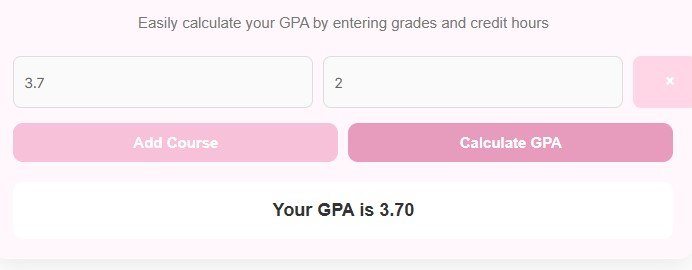
- Enter the Grade Points (e.g. 3.7) for your first course. Use the grade point value, not the letter grade, so A is 4.0, B is 3.0, and so on.
- Enter the Credit Hours for that course.
- Click Add Course to add another row, and repeat for every course.
- Click Calculate GPA to see your GPA.
If you only have letter grades, convert them to grade points first using the 4.0 scale above, or your school’s own scale. If a course is not graded, such as a pass or fail course, leave it out, because it does not count toward your GPA. To remove a row, click the small x at its right.
The GPA Formula
The calculator uses the weighted average formula:
GPA = Sum of (Grade Points x Credit Hours) divided by Total Credit Hours
Each course contributes its grade points multiplied by its credit hours, and the total is divided by the total number of credit hours. A course worth more credits therefore has more influence on the result, which is exactly how schools calculate it. A simple average of the grade points alone would give a wrong answer whenever courses have different credit hours.
Worked Example
Take two courses. The first is worth 3 credit hours with grade points of 4.0, and the second is worth 3 credit hours with grade points of 3.0.
Multiply each course: 4.0 x 3 = 12, and 3.0 x 3 = 9. Add them: 12 + 9 = 21. Add the credit hours: 3 + 3 = 6. Divide: 21 divided by 6 = 3.5.
So your GPA is 3.50, which is exactly what the calculator shows for these inputs. If you are working from the guide What Is My GPA? How to Work It Out From Your Grades, you can check your letter grade to grade point conversions there before you enter them.
When to Use It and Tips
Use this calculator at the start of a term to plan the grades you need, during the term to see where you stand, and at the end of a term to check your result before the official report. It is also useful when you are deciding whether to retake a course, because you can test what a better grade would do to your GPA.
- Enter every graded course and its correct credit hours, or the result will be wrong.
- Use your school’s exact grade point values if they differ from the standard 4.0 scale.
- Remember that a high grade in a course worth many credits lifts your GPA more than the same grade in a small course.
- Do not count pass or fail courses, and do not count courses you dropped.
To see how much your GPA changed between two terms, the guide Percent Change vs Percent Difference: What’s the Difference? explains the two ways to express a change, so you can describe an improvement correctly.
FAQs
Q1: Is this GPA calculator free?
Yes. It is completely free to use and needs no sign up or login. You can calculate as many courses and terms as you like.
Q2: Can I calculate GPA for multiple courses?
Yes. Click Add Course to add a row for each course, enter the grade points and credit hours for each one, then click Calculate GPA. You can also use it separately for each term, and your cumulative GPA is the result of adding all terms together.
Q3: Is the GPA calculation accurate?
Yes, if you enter the correct grade points and credit hours. It uses the standard weighted average formula. Use your school’s exact grade point values where they differ from the standard 4.0 scale.
Q4: Do I enter letter grades or grade points?
Grade points. On the common 4.0 scale, A is 4.0, B is 3.0, C is 2.0, D is 1.0 and F is 0, with plus and minus grades in between, such as B+ at 3.3 and A- at 3.7. Convert your letter grades to grade points first, then enter the numbers.
Q5: How do I improve my GPA?
Earn higher grades in courses worth more credits, because they count more. Retaking a failed or low grade course can also help, where your school allows it, and planning your term in advance with this calculator shows what grades you need.
Q6: Can I use this calculator on my phone?
Yes, the GPA Calculator is fully responsive and works on mobile, tablet and desktop.
Disclaimer
Disclaimer: This calculator is for educational and informational purposes only. It works out a grade point average from the grade points and credit hours you enter, using the common 4.0 scale. Your school may use a different scale, rounding rule or policy for retaken and pass or fail courses, so your official GPA may differ. Always check your result with your school.