
Markup Calculator
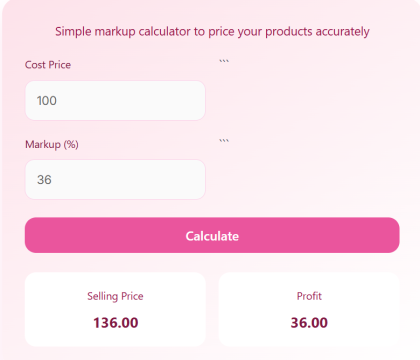
Simple markup calculator to price your products accurately
Introduction
Every product you sell has two prices in its life: what it costs you, and what you charge for it. The gap between them is your profit, and getting that gap right is the difference between a business that grows and one that slowly loses money. Price too low and you work hard for nothing. Price too high and customers go elsewhere. This Markup Calculator works out the selling price and the profit from your cost and the markup you want to add, so you can price a product in seconds instead of fumbling with a calculator.
It is made for retailers, online sellers, wholesalers, freelancers and small business owners who set prices every week. You enter the cost price and a markup percentage, and the calculator shows the selling price and the profit on each sale.
What is Markup?
Markup is the amount added to the cost price of a product to arrive at its selling price. It is usually stated as a percentage of the cost. A markup of 40 percent on a product that costs 100 means you add 40 to the cost, and sell it for 140.
Markup is not the same as profit margin, and mixing the two up is the most common pricing mistake. Markup is a percentage of the cost price, while profit margin is a percentage of the selling price. A 40 percent markup on a cost of 100 gives a profit of 40 on a selling price of 140, which is a profit margin of about 28.6 percent, not 40 percent. Keep them separate and your pricing will stay honest.
How to Use the Markup Calculator
Follow these steps to price a product:
- Enter the Cost Price, the amount the product costs you, for example 100.
- Enter the Markup (%), the percentage you want to add, for example 40.
- Click Calculate to see the Selling Price and the Profit.
Enter the cost without a currency symbol, and enter the markup as a number, such as 40 for 40 percent. Use the same currency for the cost and the selling price, and remember that the result does not include tax, delivery or other selling costs unless you add them to the cost price first.
The Markup Formula
The calculator uses two simple formulas:
Selling Price = Cost Price x (1 + Markup Percentage / 100)
Profit = Selling Price – Cost Price
In words, the selling price is the cost plus the markup amount, and the profit is the difference between the selling price and the cost. If you want a particular selling price instead, you can work backwards: divide the selling price by the cost price, subtract one, and multiply by 100 to get the markup percentage.
Worked Example
Take a product that costs 100, with a markup of 40 percent.
First, the markup amount is 40 percent of 100, which is 40. Add it to the cost: 100 + 40 = 140. The profit is the selling price minus the cost: 140 – 100 = 40.
So the Selling Price is 140.00 and the Profit is 40.00, which is exactly what the calculator shows for these inputs. If you sell ten of these products, your total profit is 400, before tax and other costs.
When to Use It and Tips
Use this calculator when you are pricing a new product, reviewing your prices, working out a discount you can afford to offer, or checking whether a product line is actually making money. It is also useful when a supplier raises their prices, because you can see at once what the new selling price should be.
- Set the markup to cover all your costs, not just the product cost: delivery, packaging, fees and your time all need paying for.
- Do not confuse markup with profit margin when you talk to an accountant or read a report.
- Review your markup regularly. Costs rise, and a price set a year ago may no longer make a profit.
- Test higher and lower markups to see how they change the selling price, and check the price against competitors.
If a pay rise has changed what your own time is worth, the Pay Raise Calculator shows your new salary and the size of the rise. If you are borrowing to buy stock, the Loan Calculator can help you work out whether the loan cost still leaves a profit.
FAQs
Q1: Is this markup calculator free?
Yes. It is completely free to use and needs no sign up. You can calculate as many products as you like.
Q2: What is the difference between markup and profit margin?
Markup is a percentage of the cost price, while profit margin is a percentage of the selling price. A 40 percent markup on a cost of 100 gives a selling price of 140 and a profit margin of about 28.6 percent, because 40 divided by 140 is 0.286.
Q3: Is this calculator accurate?
Yes. It uses the standard markup formula and gives the exact selling price and profit for the numbers you enter. The result is only as good as the cost you enter, so include all the costs that belong to the product.
Q4: Can I use it for online selling?
Yes. It is well suited to online sellers, marketplaces and small businesses, where pricing decisions are frequent and speed matters. Remember to include marketplace fees and delivery costs in the cost price.
Q5: How do I choose the right markup?
Cover all your costs first, then check what competitors charge for similar products and what your customers will pay. A markup that is too low loses money, and one that is too high loses sales, so test a few levels and watch the result.
Q6: Does the result include tax?
No. The selling price and profit do not include tax. Add tax to the selling price separately where it applies in your country, and check your local tax rules.
Disclaimer
Disclaimer: This calculator is for educational and informational purposes only and is not financial or business advice. It works out a selling price and profit from the cost and markup you enter, and it does not allow for tax, fees, changing costs or market conditions. Always check your prices against your real costs and seek professional advice before making major pricing decisions.