
Paypal Fee Calculator
PayPal Fee Calculator
PayPal Fee Calculator – Know Your Fees Instantly
Our PayPal Fee Calculator is a reliable and free online tool designed to help users instantly calculate PayPal fees for any transaction. With this PayPal fee calculator tool, you can easily determine the exact fees charged on personal and business accounts, whether you are sending or receiving money. It supports calculations for domestic and international payments, including currency conversions, so you always know how much you will actually receive or need to send.
This online PayPal calculator provides detailed breakdowns of fees, including fixed and percentage charges, ensuring complete transparency. The tool works seamlessly on all devices such as desktop, mobile, and tablet, without installing any software or registration. You can use it to plan invoices, check payment deductions, and compare PayPal fee structures to avoid undercharging clients or overpaying.
Our PayPal transaction fee calculator is user-friendly, fast, and accurate, making it ideal for freelancers, businesses, and individuals who frequently use PayPal. By using this calculator, you can optimize your payments, track costs, and make informed financial decisions. Start using our online PayPal fee calculator today to get instant PayPal fee calculations and manage your transactions efficiently.
Why Use Our PayPal Fee Calculator?
Using a PayPal fee calculator allows you to instantly determine the exact fees for any transaction, giving you a clear picture of the net amount you will receive. This helps prevent undercharging clients or sending insufficient payments, ensuring smooth financial transactions.
The tool is designed to be user-friendly, making it suitable for both beginners and professionals who want to manage their payments accurately and efficiently.
Features of the PayPal Fee Calculator:
✅ Calculates percentage-based and fixed PayPal fees.
✅ Shows the exact amount you receive after fees.
✅ Tells you the total amount to request to cover fees.
✅ User-friendly and mobile-responsive design.
✅ Immediate results without page reload.
How to Use:
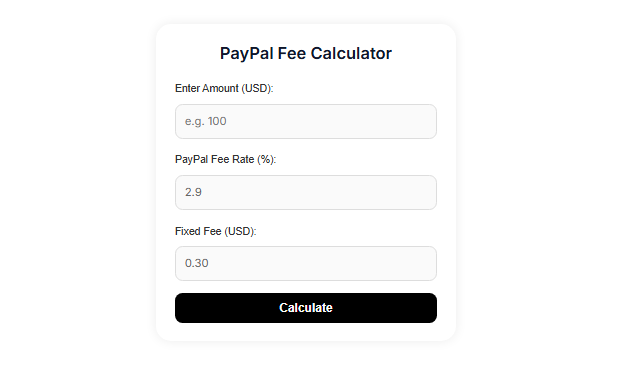
To use the PayPal Fee Calculator, first enter the payment amount in USD. Next, input the PayPal fee rate as a percentage and the fixed fee, which is usually 2.9% plus $0.30 by default. After entering these values, click the Calculate button.
The calculator will instantly display the results, showing the PayPal fee, the net amount you will receive, and the total amount you should request to cover the fees.
Smart Tips for Accurate PayPal Fee Calculations
Make sure to check your account type, as business and personal accounts may have different fee rates. Always use this calculator before sending invoices or payments to avoid surprises.
Comparing the calculated fees with your PayPal statements ensures accuracy and helps you plan transactions confidently.
FAQS
1. What is a PayPal fee calculator?
A PayPal fee calculator is an online tool that instantly calculates the fees PayPal charges on any transaction, showing you the exact amount you will receive after deductions.
2. Why should I use a PayPal fee calculator?
It helps you avoid undercharging clients or sending less than intended, ensuring accurate payments and better financial planning.
3. How do I use a PayPal fee calculator?
Simply enter the transaction amount, PayPal fee percentage, and any fixed fee. The calculator will instantly show the fees and your net received amount.
4. Can beginners use a PayPal fee calculator?
Yes, the tool is very user-friendly and designed for both beginners and professionals to easily calculate fees without confusion.
5. Does it work for international transactions?
Most calculators allow you to adjust the fee rates for international payments, helping you calculate fees accurately for cross-border transactions.
Disclaimer:
This PayPal Fee Calculator provides estimated fees for reference only. Actual fees may vary depending on PayPal policies, currency, and account type.