
Elapsed Time Calculator
Calculate the exact time difference between two dates and times instantly
What is Elapsed Time Calculator?
An Elapsed Time Calculator is a digital tool designed to calculate the exact amount of time that has passed between two specific dates and times. Instead of manually counting hours or converting days into minutes, this calculator instantly provides accurate results in days, hours, minutes, and seconds.
Elapsed time calculation is commonly used in everyday life as well as professional environments. Whether you want to measure working hours, track project durations, calculate event timing, or determine how long a task took to complete, this calculator simplifies the entire process. By entering a start date and time and an end date and time, users receive instant and reliable results without any confusion.
This tool is especially useful for people who deal with time sensitive tasks, such as freelancers, office employees, students, researchers, and event planners. It eliminates guesswork and ensures accuracy, making time management easier and more efficient.
How to Use Elapsed Time Calculator?
Using the Elapsed Time Calculator is simple and requires no technical knowledge. Follow these easy steps:
First, select the start date and time from the input field.
Then, select the end date and time.
Click the Calculate button.
The calculator will instantly display the elapsed time in days, hours, minutes, and seconds.
If the end time is earlier than the start time, the calculator will notify you to correct the input. The tool works smoothly on all devices, including mobile phones, tablets, and desktops, ensuring a seamless user experience.
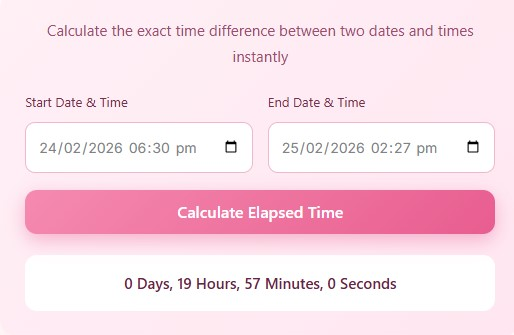
Step-by-Step Example
Step 1 → Select Start Date & Time
→ Enter the following value in the Start Date & Time field:
24/02/2026 – 06:30 PM
Step 2 → Select End Date & Time
→ Enter the following value in the End Date & Time field:
25/02/2026 – 02:27 PM
Step 3 → Click the “Calculate Elapsed Time” button
→ The calculator compares both date and time values automatically.
Step 4 → View the Result Instantly
→ The elapsed time is displayed as:
0 Days, 19 Hours, 57 Minutes, 0 Seconds
Easy Breakdown of the Calculation
24 Feb 06:30 PM → 25 Feb 06:30 PM
→ Equals 24 hours25 Feb 06:30 PM → 25 Feb 02:27 PM
→ Minus 4 hours and 33 minutesFinal Elapsed Time
→ 24 hours − 4 hours 33 minutes
→ = 19 hours 57 minutes
That’s why the final output is:
0 Days, 19 Hours, 57 Minutes, 0 Seconds
Advantages of Using Elapsed Time Calculator
Using an Elapsed Time Calculator offers multiple benefits for both personal and professional use:
1. Saves Time
Manual calculations can be slow and confusing. This calculator provides instant results with just a few clicks.
2. High Accuracy
Human errors are common when calculating time differences. This tool ensures precise and consistent calculations every time.
3. User-Friendly Interface
The calculator is designed with simplicity in mind, making it easy for beginners and non-technical users.
4. Fully Responsive Design
You can use the calculator on any device without losing functionality or readability.
5. Improves Productivity
By quickly calculating elapsed time, users can focus more on planning, tracking, and decision making.
6. No Installation Required
There is no need to download software or create an account. The calculator works directly in your browser.
Practical Uses of Elapsed Time Calculator
The Elapsed Time Calculator can be used in many real-life scenarios, such as:
Tracking employee work hours
Calculating project durations
Measuring study or exam time
Managing shift schedules
Tracking travel or event durations
Monitoring task completion time
Because of its flexibility, this calculator is helpful for individuals, businesses, and educational institutions alike.
FAQs
Q 1:Is the Elapsed Time Calculator free to use?
Yes, the calculator is completely free and accessible without any limitations.
Q 2:Can I use this calculator on my mobile device?
Absolutely. The calculator is fully responsive and works smoothly on smartphones and tablets.
Q 3:Does the calculator show results in seconds as well?
Yes, it calculates and displays elapsed time in days, hours, minutes, and seconds.
Q 4:What happens if I enter an invalid date or time?
The calculator will prompt you to enter valid start and end times before showing results.
Q 5:Is the calculated data stored anywhere?
No, the calculator does not store or track any user data. All calculations happen instantly in your browser.
Disclaimer
This Elapsed Time Calculator is provided for educational and informational purposes only. While every effort is made to ensure accurate calculations, the results should not be used as a substitute for professional, legal, or financial advice. Always verify critical time calculations independently when accuracy is essential.